IEEE Wireless Standards Explained: Wi-Fi, Bluetooth, 802.1X and the 802.11 Alphabet
A complete, visual guide to IEEE 802.11 Wi-Fi generations and features, 802.15.4, Bluetooth, WiMAX, TV white spaces, and why 802.1X is not another Wi-Fi version.
Have you ever seen 802.11ai, 802.11ax, 802.1X and 802.15.4 in the same paragraph and wondered whether they are four versions of Wi-Fi? They are not. One is a faster connection feature, one identifies a Wi-Fi generation, one controls access, and one describes low-power personal-area radio.
This guide turns that apparent number soup into a usable map. We will cover the major IEEE wireless families, every amendment in the supplied reference sheet, how the technologies fit together in a corporate network, and the details that matter on exams and in real deployments.
> Start with the number before the letters. IEEE 802 is a family of networking standards. 802.11 covers wireless LANs; 802.15 covers wireless personal-area networks; 802.16 covers WiMAX; 802.22 covers wireless regional-area networks. 802.1X is access control, not a radio generation.
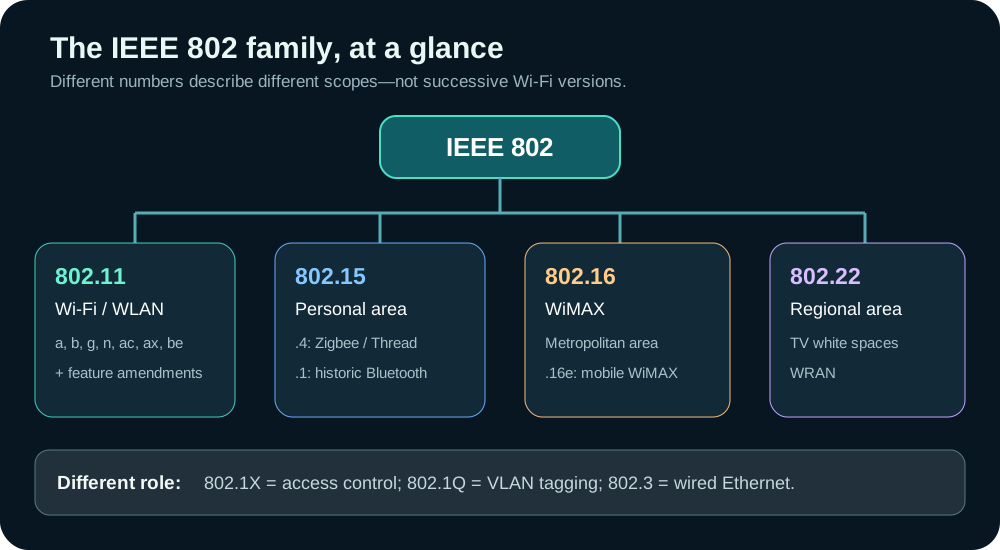
1. The wider IEEE 802 map
| Standard or family | What it covers | A quick example | |---|---|---| | 802.1 | LAN management and bridging-related standards | Network access and VLANs | | 802.1Q-virtual-local-area-network-explained) | VLAN tagging | Separate staff and guest traffic | | 802.1X | port-the-internets-core-protocol)-and-UDP-ports-explained)-based network access control | Authenticate before granting network access | | 802.3 | Wired Ethernet | Cabled office network | | 802.11 | Wireless LAN (WLAN) | Wi-Fi access point and laptop | | 802.15 | Wireless personal-area networking (WPAN) | Low-power sensors | | 802.15.1 | Historical IEEE Bluetooth specification | Older reference material | | 802.15.4 | Low-rate WPAN physical and MAC layers | Radio foundation for Zigbee and Thread | | 802.16 | Broadband wireless metropolitan-area networking | WiMAX, including mobile 802.16e | | 802.22 | Wireless regional-area networking (WRAN) | Longer-range use of TV white-space spectrum |
Important qualification: "IEEE association" does not mean IEEE governs every current product using that radio. Modern Bluetooth versions are specified by the Bluetooth SIG. Similarly, Zigbee and Thread are distinct higher-layer ecosystems built on 802.15.4; neither is simply another name for IEEE 802.15.4.
2. Wi-Fi generations: the names worth memorising
802.11 is the wireless LAN family. The original 1997 standard used 2.4 GHz and supported 1 or 2 Mbps—historically important, but not what people mean by modern Wi-Fi. Later amendments added new radio capabilities. Consumer-friendly "Wi-Fi 4/5/6/7" names are not IEEE standard numbers; they make the generations easier to remember.
| Common name | IEEE amendment | Main bands | Key improvement | |---|---|---|---| | Legacy Wi-Fi | 802.11a | 5 GHz | OFDM, up to 54 Mbps nominal PHY rate | | Legacy Wi-Fi | 802.11b | 2.4 GHz | Up to 11 Mbps nominal PHY rate | | Legacy Wi-Fi | 802.11g | 2.4 GHz | Up to 54 Mbps nominal PHY rate | | Wi-Fi 4 | 802.11n | 2.4 and 5 GHz | MIMO and wider channels | | Wi-Fi 5 | 802.11ac | 5 GHz | Wider channels, beamforming and downlink MU-MIMO | | Wi-Fi 6 | 802.11ax | 2.4 and 5 GHz | OFDMA and more efficient performance in busy environments | | Wi-Fi 6E | 802.11ax in 6 GHz | 6 GHz, alongside 2.4/5 GHz on many devices | Access to additional 6 GHz spectrum; not a new IEEE amendment | | Wi-Fi 7 | 802.11be | 2.4, 5 and 6 GHz where permitted | Multi-Link Operation, up to 320 MHz channels in 6 GHz and higher peak capability |
The exam shortcut: n → 4, ac → 5, ax → 6 (and 6E), be → 7. Do not assign Wi-Fi 6E a separate IEEE amendment: it is still 802.11ax, with 6 GHz support. "Up to" values describe ideal physical-layer rates, not the speed your application will actually see.
Band availability, permissible channel widths and transmit power depend on local regulations. A 6 GHz-capable device cannot assume 6 GHz is authorized or supported in every country. Higher frequency does not automatically mean a faster connection through walls; coverage depends on attenuation, antenna design, power limits and the deployment.
!Illustration of an office access point providing radio coverage to laptops and smart devices.
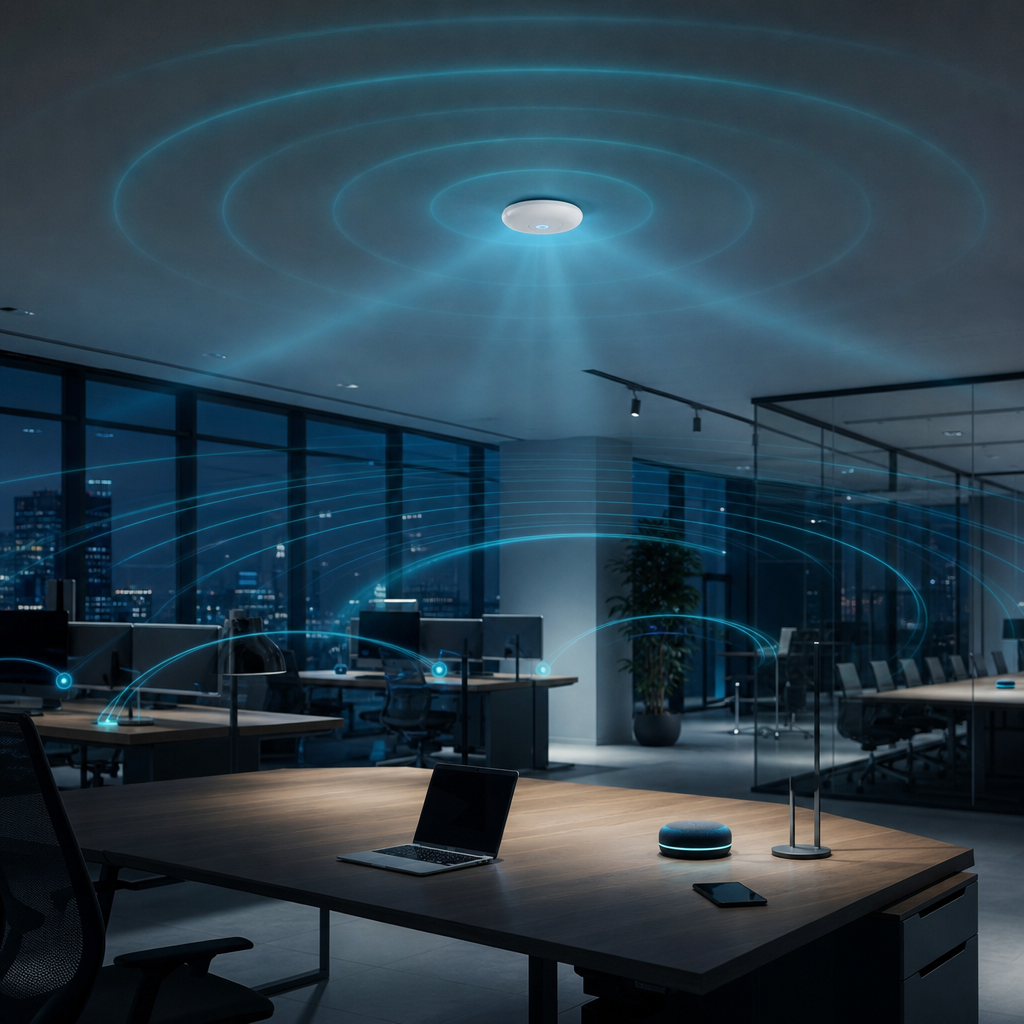
What changed inside the radio?
- MIMO (802.11n) uses multiple antennas and spatial streams to improve throughput and robustness. Actual gains depend on both client and access point capabilities.
- MU-MIMO (802.11ac and later) lets an access point serve multiple compatible devices more effectively. The first 802.11ac implementation focused on downlink MU-MIMO; later generations extended multi-user techniques.
- OFDMA (802.11ax) divides a channel into resource units, so compatible devices can share airtime more efficiently—especially useful with many small transmissions.
- 6 GHz (Wi-Fi 6E / Wi-Fi 7) brings additional spectrum where authorized, but also requires compatible devices and access points.
- Multi-Link Operation (802.11be) can coordinate more than one Wi-Fi link, potentially improving latency, reliability or throughput. What a device actually supports varies by implementation.
- 320 MHz channels (802.11be) are an optional peak-bandwidth capability in 6 GHz where spectrum and rules allow; they are not available by default on every Wi-Fi 7 connection.
60 GHz and sub-1 GHz: still part of 802.11
| Amendment | Name or role | Why it matters | |---|---|---| | 802.11ad | WiGig / Very High Throughput | Around 60 GHz, very high throughput at short range, with weaker penetration through obstacles | | 802.11ay | Enhanced 60 GHz operation | Extends the 11ad approach with higher capacity and improved capabilities | | 802.11ah | Wi-Fi HaLow | Sub-1 GHz operation aimed at longer-range, lower-power IoT; not a regular 2.4/5 GHz home Wi-Fi generation |
Do not confuse WiGig with Wi-Fi 7. Both are in the 802.11 family, but 802.11ad/ay describe the 60 GHz branch, while 802.11be is the amendment behind Wi-Fi 7.
3. The 802.11 letters that are features, not new Wi-Fi generations
This is the most useful distinction in the whole guide. The letters a, b, g, n, ac, ax and be are commonly discussed as radio generations. Other amendments solve specific problems such as roaming, security, mesh or power consumption; an access point can use several of them at the same time.
| Amendment | Feature | What it does in practice | |---|---|---| | 802.11i | WLAN security | Security improvements associated with the WPA2 / RSN era; it is not itself the consumer-facing WPA2 brand | | 802.11r | Fast BSS Transition | Speeds up authentication-related work when a client roams to another AP | | 802.11k | Radio resource management | Supplies measurements and neighbor information that can assist AP selection | | 802.11v | Wireless network management | Allows network-assisted steering and management, including suggestions to move to another AP | | 802.11w | Protected management frames | Protects certain management frames from forgery; it does not encrypt every management frame | | 802.11s | Mesh networking | Defines mechanisms for wireless mesh links | | 802.11e | QoS enhancements | Prioritizes delay-sensitive traffic such as voice or video | | 802.11u | Interworking | Helps devices discover information about and access external/public networks | | 802.11ai | Fast Initial Link Setup (FILS) | Reduces time for an initial connection in supported deployments | | 802.11p | Vehicular / WAVE | Wireless communications designed for vehicle and roadside applications | | 802.11af | TV white-space WLAN | Uses locally available unused TV-channel spectrum under applicable rules | | 802.11ba | Wake-Up Radio | Lets compatible devices use a low-power wake-up mechanism |
Roaming example: You walk through an office while on a call. 802.11k helps the client learn about neighbors; 802.11v can suggest a better AP; 802.11r can reduce the time to complete a transition. These features help, but the client ultimately decides how and when to roam; configuration and device support both matter.
Security example: 802.11i established WLAN security improvements, while 802.11w protects specific management frames. Neither is a replacement for a correctly configured WPA2 or WPA3 security mode. Even with modern protection, patching, strong credentials and monitoring still matter.
A standards nuance: Many lettered amendments were later folded into consolidated IEEE 802.11 revisions. A feature being described by its original amendment letter is useful shorthand, not proof that modern equipment runs an isolated, standalone copy of that amendment.
4. Bluetooth, 802.15.4, Zigbee and Thread are not interchangeable
WPAN means wireless personal-area network: typically shorter-range links connecting nearby devices. The names here refer to different standards bodies and different layers of a system.
| Technology | Standards relationship | Typical use | |---|---|---| | Bluetooth Classic | Bluetooth SIG today; historically connected to IEEE 802.15.1 | Headsets, audio and peripherals | | Bluetooth 1.x | Early Bluetooth SIG generations | Early short-range device connections | | Bluetooth 2.x | Enhanced Data Rate (EDR) era | Peripherals and audio | | Bluetooth 3.x | High-speed features, including an optional alternate MAC/PHY approach | Short-range device connectivity | | Bluetooth 4.0 | Introduced Bluetooth Low Energy (BLE) | Battery-sensitive devices | | Bluetooth 4.1 / 4.2 | BLE refinements | IoT devices and interoperability improvements | | Bluetooth 5.x | Successive BLE enhancements; features vary by version | Beacons, sensors, wearables and peripherals | | IEEE 802.15.4 | Defines a low-rate, low-power PHY and MAC | Radio/link layer for sensor networks | | Zigbee | Higher-layer networking over 802.15.4 | Automation and sensor meshes | | Thread | IPv6-address-ipv4-ipv6-and-addressing-explained)-based networking over 802.15.4 | Smart-home device meshes | | 6LoWPAN | IPv6-address-ipv4-ipv6-and-addressing-explained) adaptation mechanism, commonly used with 802.15.4 | Carrying IPv6 across constrained links |
Think of 802.15.4 as the lower-layer foundation; Zigbee and Thread define different ways to organize a network above it. 6LoWPAN compresses and adapts IPv6-address-ipv4-ipv6-and-addressing-explained) for constrained links. Bluetooth does not become Zigbee simply because both are used for IoT. Likewise, IEEE 802.15.1 is a historical Bluetooth association, not the specification number for modern Bluetooth 5.x.
Which one would you choose?
For headphones, Bluetooth is a natural fit. For battery-powered home automation devices in a mesh, Thread or Zigbee may make sense depending on the ecosystem. For a laptop needing general network access, Wi-Fi is the ordinary choice. Requirements such as interoperability, latency, power budget, data rate, radio conditions and certification matter more than any one family number.
5. WiMAX, regional networks and white spaces
The IEEE 802.16 family describes broadband wireless metropolitan-area networks, historically known as WiMAX. 802.16e added mobility-oriented capabilities (mobile WiMAX); 802.16d is a commonly seen shorthand for the fixed-broadband generation. WiMAX is not simply a larger Wi-Fi access point: it has a different standard and deployment model. This is chiefly a historical/standards distinction for many readers today, not a claim that WiMAX is today's dominant mobile network.
802.22, the Wireless Regional Area Network (WRAN) family, targets longer-range use of TV white spaces: portions of broadcast-address-resolution-protocol-explained) spectrum available under specified regulatory and interference-protection conditions. 802.11af also explores TV white-space operation, but belongs to the 802.11 WLAN family. Same kind of spectrum does not mean same standard.
802.11p is the vehicular/WAVE amendment for vehicle-to-vehicle and roadside communications. It is another 802.11 branch, not a Wi-Fi 4-to-7 generation. The commercial/regulatory ecosystem for vehicle communications can vary by country and over time.
6. Why 802.1X is not a wireless standard
802.1X is port-the-internets-core-protocol)-and-UDP-ports-explained)-based network access control. It can be used on wired Ethernet as well as on enterprise Wi-Fi. It answers "should this user or device get network access?"—not "what radio does this laptop use?"
On enterprise Wi-Fi, a typical flow uses these separate pieces:
- 802.11ax supplies the Wi-Fi radio connection (if both sides support it).
- WPA3-Enterprise defines the Wi-Fi security suite in this example; a deployment could instead use another supported enterprise security mode.
- 802.1X gates network access while identity is checked.
- EAP (Extensible Authentication protocol) carries the chosen authentication exchange, such as EAP-TLS. The method and credential checks are policy decisions.
- RADIUS commonly carries authentication/authorization messages between the access point or controller and an authentication server; it is not the over-the-air radio protocol.
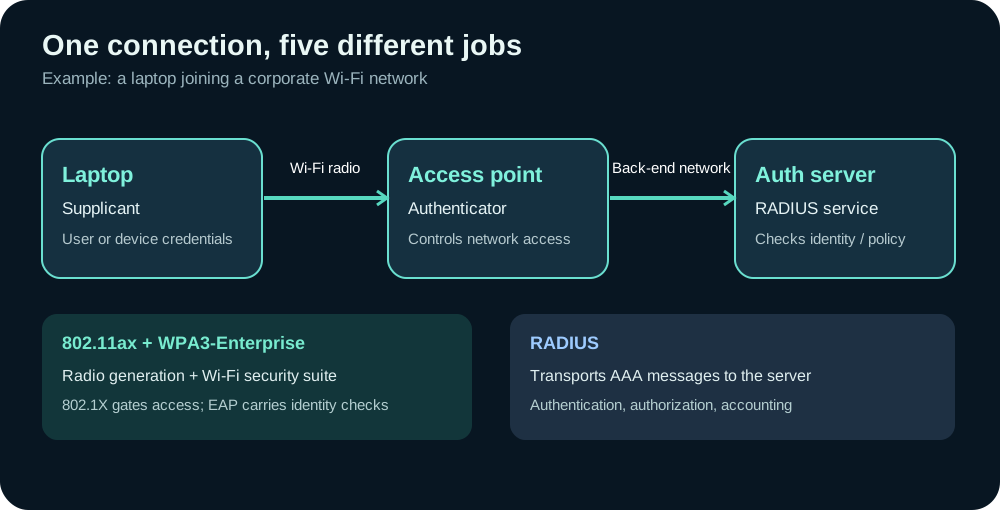
The device is often called the supplicant, the access point the authenticator, and the back-end identity service the authentication server. The AP's connection to that server is normally over a separate network path. 802.1X does not mean WPA3, and a home Wi-Fi password does not automatically imply a RADIUS server. Also, 802.1Q-virtual-local-area-network-explained) is for VLAN tagging, not authentication: Q = VLAN, X = access control.
7. One-page memory sheet
| Remember | Meaning | |---|---| | 802.3 | Wired Ethernet | | 802.11 | Wi-Fi / WLAN family | | 802.15 | Personal-area wireless family | | 802.15.1 | Historical Bluetooth association | | 802.15.4 | Low-power radio/link foundation for Zigbee and Thread | | 802.16 / 802.16e | WiMAX / mobile WiMAX | | 802.22 | Regional-area TV white-space network | | 802.1Q-virtual-local-area-network-explained) / 802.1X | VLAN tags / network access control | | 11n / 11ac / 11ax / 11be | Wi-Fi 4 / 5 / 6 (and 6E) / 7 | | 11ad / 11ay | 60 GHz WiGig branch | | 11ah / 11ba | Sub-1 GHz HaLow / low-power wake-up radio | | 11i / 11w | WLAN security improvements / protected management frames | | 11r / 11k / 11v | Faster roaming / neighbor information / network-assisted management | | 11s / 11e / 11u / 11ai | Mesh / QoS / interworking / faster initial connection | | 11p / 11af | Vehicular wireless / TV white-space WLAN |
The final test: If somebody says 802.11ai, 802.11ax, 802.1X and 802.15.4 in one sentence, translate it as fast initial Wi-Fi connection, Wi-Fi 6 radio, access control, and low-power WPAN foundation. They are four different jobs, not four generations of the same thing.
Sources and further reading
- IEEE 802 LAN/MAN Standards Committee-how-https-keeps-your-data-safe)-tls-how-https-keeps-your-data-safe)://www.ieee802.org/) — official family overview and working groups.
- IEEE 802.11 Wireless LAN Working Group-how-https-keeps-your-data-safe)-tls-how-https-keeps-your-data-safe)://www.ieee802.org/11/) — WLAN standards, projects and amendments.
- IEEE 802.15 Working Group-how-https-keeps-your-data-safe)-tls-how-https-keeps-your-data-safe)://www.ieee802.org/15/) — WPAN standards, including the 802.15.4 family.
- IEEE 802.1 Working Group-how-https-keeps-your-data-safe)-tls-how-https-keeps-your-data-safe)://www.ieee802.org/1/) — LAN access-control and bridging work.
- Wi-Fi Alliance: Discover Wi-Fi-how-https-keeps-your-data-safe)-tls-how-https-keeps-your-data-safe)://www.wi-fi.org/discover-wi-fi) — Wi-Fi generational naming and certification context.
- Bluetooth SIG specifications-how-https-keeps-your-data-safe)-tls-how-https-keeps-your-data-safe)://www.bluetooth.com/specifications/specs/) — current Bluetooth specifications and versions.
Standards capabilities are not a promise that every device implements every optional feature. Always check the device, certification, configuration and local spectrum rules before making deployment decisions.